A birthday greeting becomes more memorable when it sounds like something only your friends would say. A reunion announcement feels different when the people attending become part of the entertainment. These are the kinds of small, personal projects that make AI rap videos interesting: familiar faces, a shared story, and a short performance built around a specific moment.
For someone exploring the format, the most useful question is not how many effects a tool can produce. It is how to turn a simple idea into a clip that feels coherent. Choosing suitable photos, writing a focused brief, and matching the scene to the occasion all help give the finished video a clear purpose.
What Does an AI Rap Video Generator Do?
An AI rap video generator uses visual references and written direction to create a rap performance. Different products approach that process differently, so it helps to understand the workflow before choosing settings or purchasing credits.
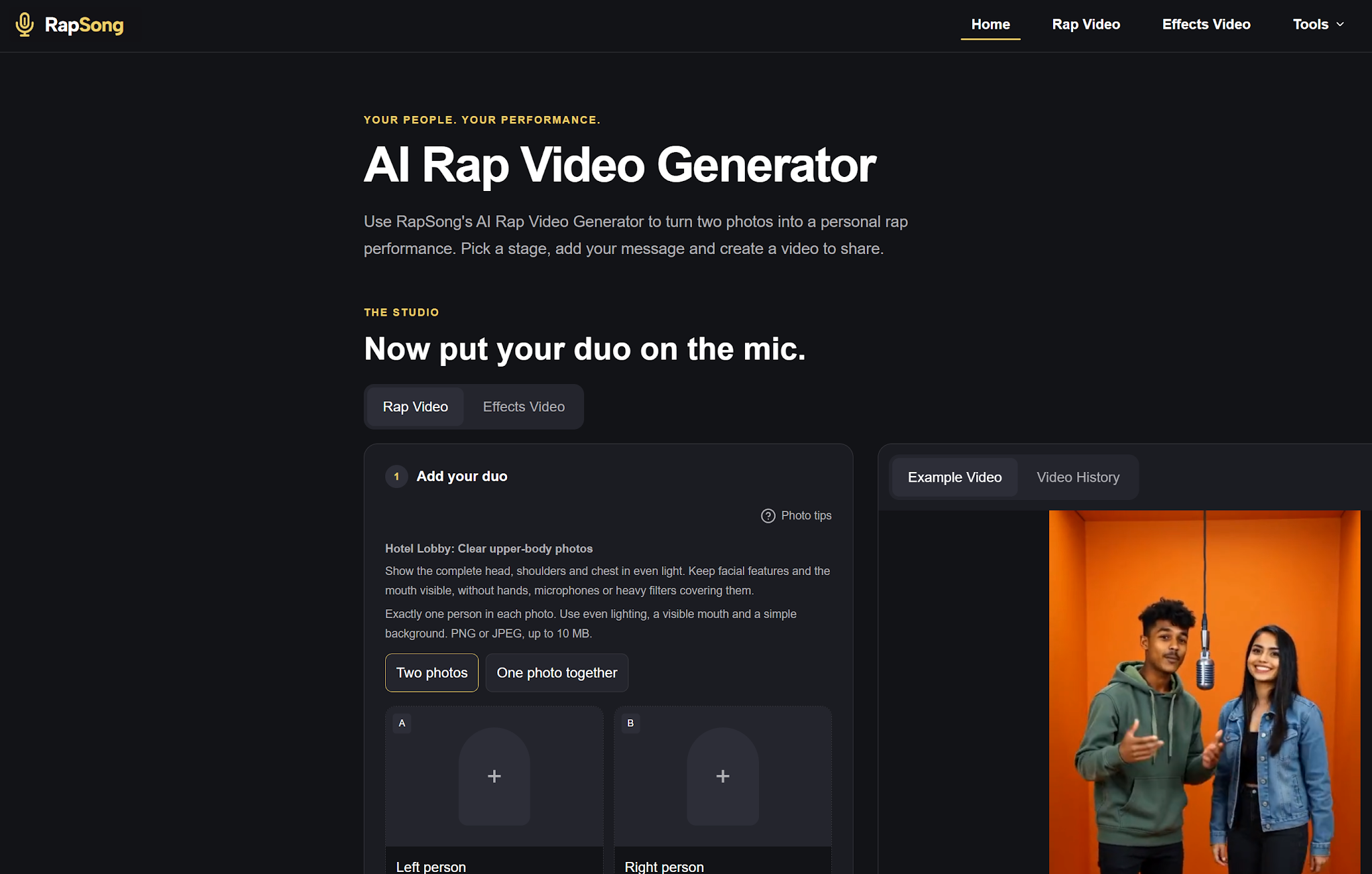
RapSong’s AI Rap Video Generator focuses on personalized duo performances. Its homepage allows users to start with two individual portraits or one photo containing both people, choose a setting, and add a message. Users can review a generated scene image before moving on to video creation. The available settings include different durations, resolutions, and aspect ratios.

This makes the creative starting point straightforward: decide who belongs in the performance and what the moment should mean. The technology provides the production mechanism; the personal details provide the reason to watch.
Start With the Occasion, Not the Effects
Before uploading anything, describe the intended video in one sentence. For example: two friends celebrating a birthday with a playful rap about their weekend basketball games. That sentence establishes the performers, the occasion, and the emotional tone.
A focused concept is easier to develop than a request containing several unrelated ideas. Trying to combine a birthday tribute, a business advertisement, and a dramatic concert sequence in one short clip can make the result feel scattered.
Think about the viewer, too. A private family message can rely on shared memories that need little explanation. A public social post needs enough context for someone unfamiliar with the people involved. The same visual concept may need a different opening caption depending on where it will appear.
Choose Photos That Give the Performance a Strong Foundation
Photo selection deserves attention because the faces are the most personal part of the project. Choose clear images with even lighting and visible facial features. Avoid starting with heavily filtered pictures or portraits where a hand, sunglasses, or another object hides important details.
RapSong’s upload guidance recommends visible heads, shoulders, and chests, with one person in each image when using separate portraits. Following the reference requirements is a useful first step, although it does not guarantee a particular result.
When comparing possible photos, prioritize clarity over glamour. A simple, well-lit portrait may be a more practical reference than a dramatic photograph with deep shadows. Use pictures the people involved have agreed to share, especially when the final clip will be posted publicly.

Write a Brief That Contains a Real Story
A useful creative brief includes the occasion, one memorable detail, and the desired mood. Those elements give the performance direction without overwhelming it.
Consider this example:
“Create a cheerful rap duet for Alex’s birthday. The two friends should celebrate their Saturday basketball games and Alex’s habit of arriving with coffee for everyone. Keep the mood warm, playful, and energetic.”
The coffee detail makes the idea more distinctive than a generic request to celebrate a birthday. It gives the audience something recognizable and makes the message feel chosen rather than interchangeable.
Treat the prompt as a creative direction. RapSong explains that exact wording, voices, lip synchronization, and facial consistency can vary. If a name or message must appear exactly, consider adding it as a checked caption during editing instead of relying entirely on generated vocals.
Match the Setting to the Message
The background should support the idea rather than compete with it. A recording studio suggests a focused musical performance. A party setting can reinforce a birthday message. A relaxed outdoor environment may suit a friendly greeting.
Choose one main atmosphere and keep the rest of the brief consistent with it. Warm lighting, relaxed gestures, and a cheerful message work together naturally. Mixing conflicting moods can make a short video harder to read.
Review the scene image with the intended audience in mind. Are both people easy to recognize? Does the composition leave enough room around their faces? Does the setting make sense for the occasion? Addressing obvious problems at this stage gives the video a stronger visual starting point.
Give a Short Video One Clear Job
A brief clip works best when it delivers a single idea. It might say happy birthday, introduce two teammates, announce a reunion, or share an affectionate joke. It does not need to explain an entire relationship.
Imagine a couple celebrating an anniversary. A reference to their first rainy camping trip could be enough to make the video personal. Adding every holiday, favorite restaurant, and milestone would dilute that central memory.
For a small business, the same principle applies. Two team members could introduce a new project with one clear message. Keep important details, such as dates or booking instructions, in readable accompanying text. The performance can establish personality while the caption supplies practical information.
Review the Result as a Viewer Would
Once the video is ready, watch it from beginning to end before sharing. Listen to the words, check the faces, and notice whether the movement feels distracting. Review any visible text for mistakes.
Audio deserves a separate check. On RapSong, music and vocals depend on selecting a model and settings that support audio. Review those options before generating, rather than assuming every configuration includes the same sound capabilities.
Next, watch the clip at the size your audience will actually see. A composition that looks comfortable on a desktop may feel crowded on a phone. If you add captions afterward, keep them readable and away from important facial details. A simple edit can help the viewer understand the occasion immediately.
It also helps to keep a simple record of each attempt: the photos used, the message, and the settings selected. If a result needs improvement, change one element at a time. This makes it easier to understand whether a clearer portrait, a shorter brief, or a different composition produces a more convincing performance for the particular idea you want to share.
Make the Personal Detail the Main Attraction
The most appealing reason to experiment with this format is the opportunity to turn an ordinary photograph into a shared creative moment. A thoughtful reference to a friendship or celebration can carry more meaning than a complicated visual concept.
For a first attempt, keep the scope manageable: two suitable portraits, one occasion, one personal detail, and a consistent mood. Review the available generation settings and credit quote before proceeding, then judge the finished result on whether it communicates the intended feeling.
To explore the workflow and current options, visit https://rapsong.io/. Start with a story the people involved will recognize. That is what gives a short AI rap performance a reason to be remembered.



Leave a Reply