Most photo libraries contain far more images than anyone knows what to do with. Family portraits sit in cloud storage, holiday photos disappear into old folders, and carefully taken product shots get used once before being forgotten.
That doesn’t mean the images have lost their value. Sometimes they just need a different treatment.
AI photo tools now make it possible to turn familiar pictures into artwork, gifts, design elements, and social content without spending hours in professional editing software. Two approaches that work particularly well are converting a photograph into a painting and reducing a subject to a clean silhouette. The results look very different, but both start with the same idea: take the visual material you already have and give it a new purpose.
Turn a familiar photograph into artwork
Applying a basic filter to a photo is easy, but the result often looks exactly like what it is: a photograph covered with a digital texture. The colors may change and the surface may appear rougher, while the underlying image remains untouched.
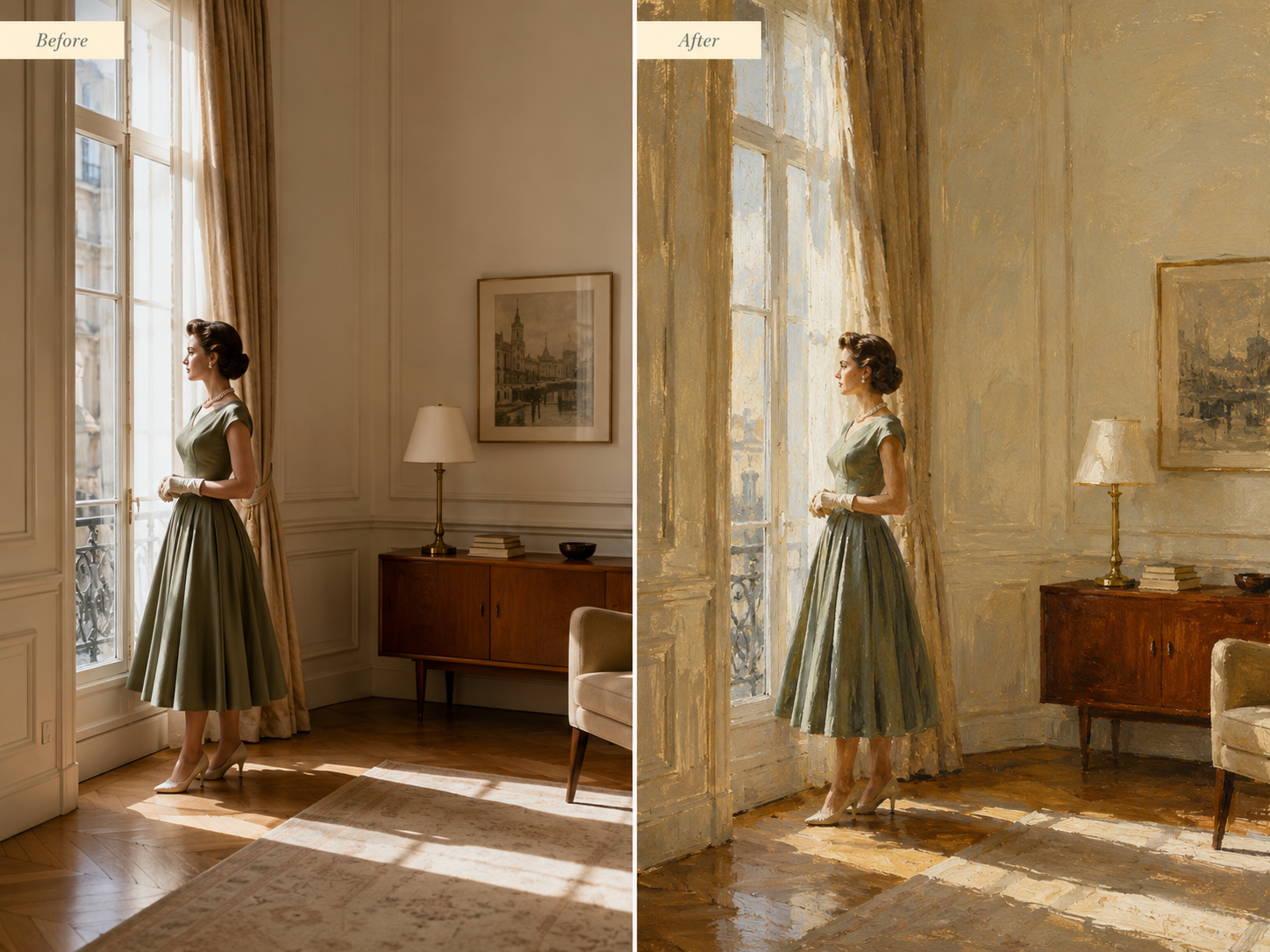
A more convincing image to painting process goes further. It interprets the subject, lighting, depth, and surrounding environment so the full scene feels painted rather than processed.
This distinction matters most with portraits and detailed subjects. Hair should become natural brush marks instead of a blurred mass. Facial features should remain recognizable. Clothing, jewelry, glasses, pet fur, and product details should still resemble the original, even when rendered in a different medium.
Pixlio offers four styles for this type of transformation: Oil Painting, Watercolor, Impressionist, and Acrylic Canvas. They are not minor variations of the same effect. Oil Painting suits portraits and scenes that benefit from layered texture and richer shadows. Watercolor gives images softer edges and a lighter atmosphere. Impressionist works well when color and natural light matter more than precise detail. Acrylic Canvas produces a bolder, more contemporary finish.
Choosing the right style depends on the photo and what you plan to do with it. A family portrait may suit the warmth of oil paint, while a travel landscape can work beautifully as a watercolor. A colorful street scene might benefit from energetic impressionist brushwork. The best option is not always obvious, so trying more than one style is worth the extra minute.

A mid-century portrait transformed from a natural photo into a richly textured painting with Pixlio.
The finished images have practical uses beyond social media. They can become framed wall art, personalized greeting cards, canvas prints, digital invitations, or thoughtful gifts. A painted version of a wedding photo, a beloved pet, or a childhood home has a personal quality that a generic piece of decoration cannot match.
Create a stronger design by removing the detail
Painting transformations add visual texture. Silhouettes move in the opposite direction by taking most details away.
That simplicity is exactly what makes them useful.
A clear silhouette can communicate pose, movement, identity, or shape without depending on facial features, colors, or background details. It works well in posters, profile images, presentation slides, craft projects, stickers, engraved gifts, and minimalist wall prints.
Creating one manually is often tedious. The subject must be traced or selected carefully, particularly around hair, clothing, pet fur, or irregular objects. A silhouette maker handles the initial subject detection automatically, preserving the original outline and filling it with a solid color.
Pixlio lets users keep the traditional black shape or choose a custom color that fits the project better. A white silhouette can stand out on a dark poster. A brand color may suit a presentation or campaign graphic. Softer colors can work for nursery artwork, wedding stationery, or keepsakes.
There are also two output modes. The transparent option produces a PNG that can be placed directly into another design. The second keeps the original background while converting the foreground subject into a solid shape, creating a more dramatic poster-like effect.
One small but useful feature is the ability to inspect the silhouette against checkerboard, white, and dark preview backgrounds before downloading. Fine edge problems are easy to miss when viewed against only one color. Checking several backgrounds helps reveal unwanted outlines or rough areas before the file goes into a larger project.
Match the treatment to the purpose
These two approaches serve different creative goals.
A painted image keeps much of the original scene and gives it a richer artistic character. It works best when the photograph itself carries emotional or visual importance. A silhouette removes most of that information and keeps only the shape, making it better suited to graphic design and minimalist presentation.
The source image still affects the outcome. Clear, well-lit photos with a distinct subject usually produce stronger results. A busy background may be manageable for a painting, but clean separation between subject and background helps silhouette detection. Starting with the best available photograph reduces the amount of correction needed later.
It also helps to decide where the finished image will be used before choosing a treatment. A large framed print needs different visual qualities from a small social avatar. A craft template may require transparency, while a poster can benefit from keeping the original setting.
Old photos can become useful again
Not every creative project needs a new photo shoot or an image generated from scratch. A picture that already means something can often be the strongest starting point.
Turning it into a painting can bring out its mood and make it suitable for display. Converting it into a silhouette can strip it down to a versatile design asset. Neither approach requires advanced editing skills, but both can give an ordinary photograph a reason to be seen again.


Leave a Reply